
Anony Botter FAQ
Anony Botter is a Slack app for anonymous messages, polls and thread replies. Type /anony, pick a channel and send: the post appears under the app's name, not yours. The free plan includes 20 messages, then 3 per day, plus 1 poll per day. Admins can see who sent a message only if audit mode, an Enterprise setting, was on when it was sent.
Getting started
What is Anony Botter?
Anony Botter is a Slack app that lets people post anonymous messages, anonymous polls and anonymous thread replies in Slack channels. Posts appear under the app's name, not the sender's. Community flagging is free; moderator approval and channel restrictions are on Enterprise. It is priced per workspace and has a free-forever plan.
See plans and pricing or the step-by-step guide.
How do I send an anonymous message in Slack?
Install Anony Botter, then type /anony in any channel the app can post in and press Enter. In the window that opens, pick the destination channel, write your message and click Send. The message is posted by the Anony Botter app, so your name isn't shown. You can also use the "Send anonymous message" shortcut.
Full walkthrough with screenshots: how to send an anonymous message in Slack.
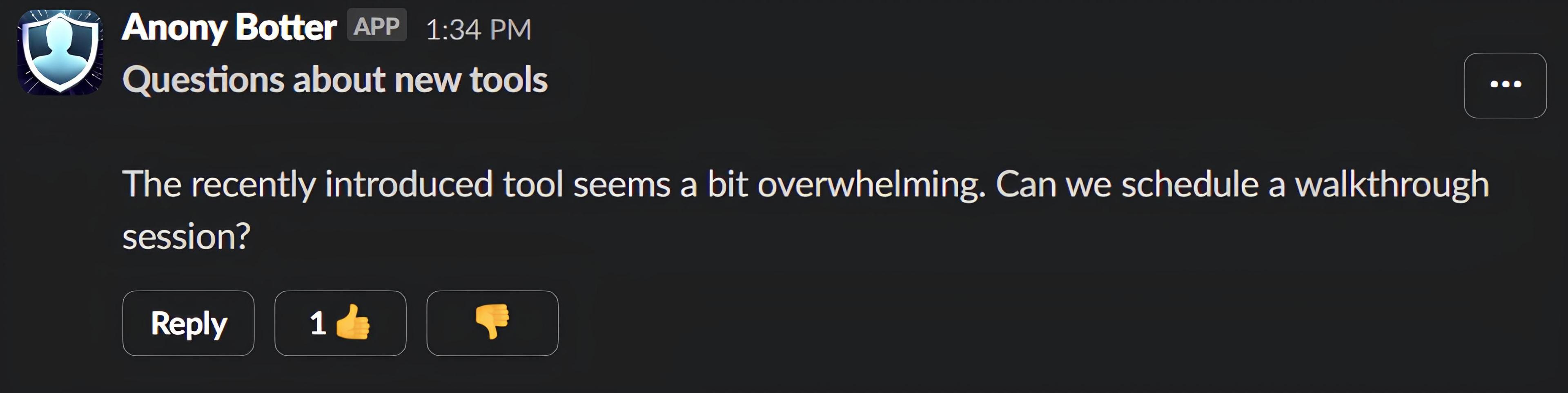
What commands and shortcuts does Anony Botter have?
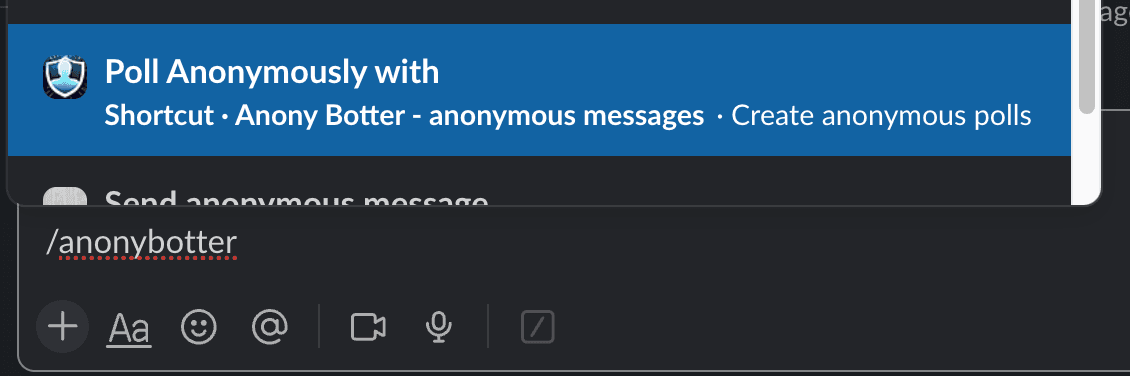
There is one slash command, /anony, which opens the anonymous message window. There are also two global shortcuts in Slack's shortcuts menu, "Send anonymous message" and "Poll Anonymously", and a "Reply anonymously" shortcut in any message's menu. Polls are created with the shortcut or the button on the app's Home tab, not with a slash command.
How do I invite Anony Botter to a private channel?
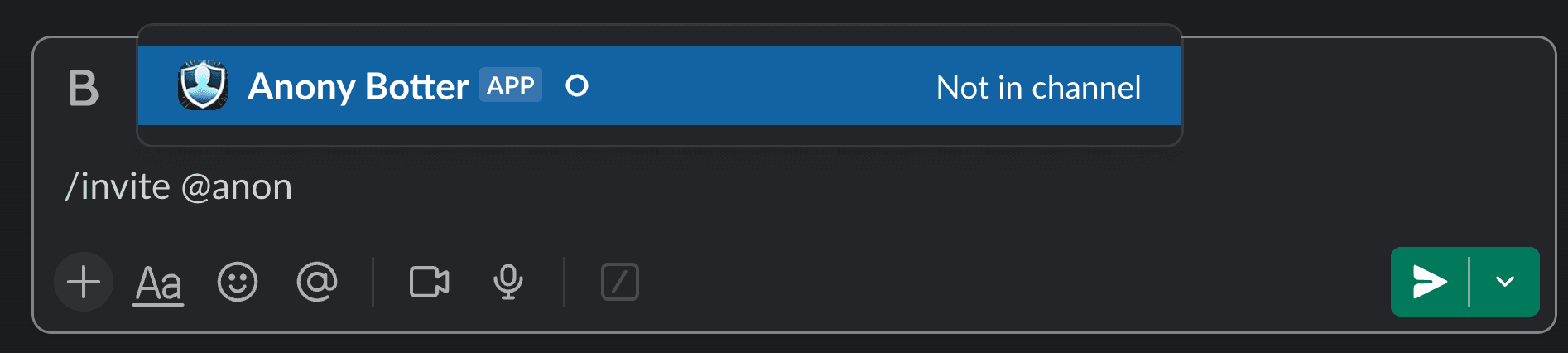
Open the private channel, type /invite @Anony Botter and press Enter. After that the app can post anonymous messages and polls in that channel just as it does in public channels. Public channels don't need an invite.
Who can install Anony Botter?
Anyone who is allowed to add apps to your Slack workspace. If your workspace requires admins to approve apps, an admin approves the request first. Installing once covers the whole workspace, and pricing is per workspace rather than per user.
Add Anony Botter to Slack (free plan).
Anonymity and privacy
Can Slack admins see who sent an anonymous message?
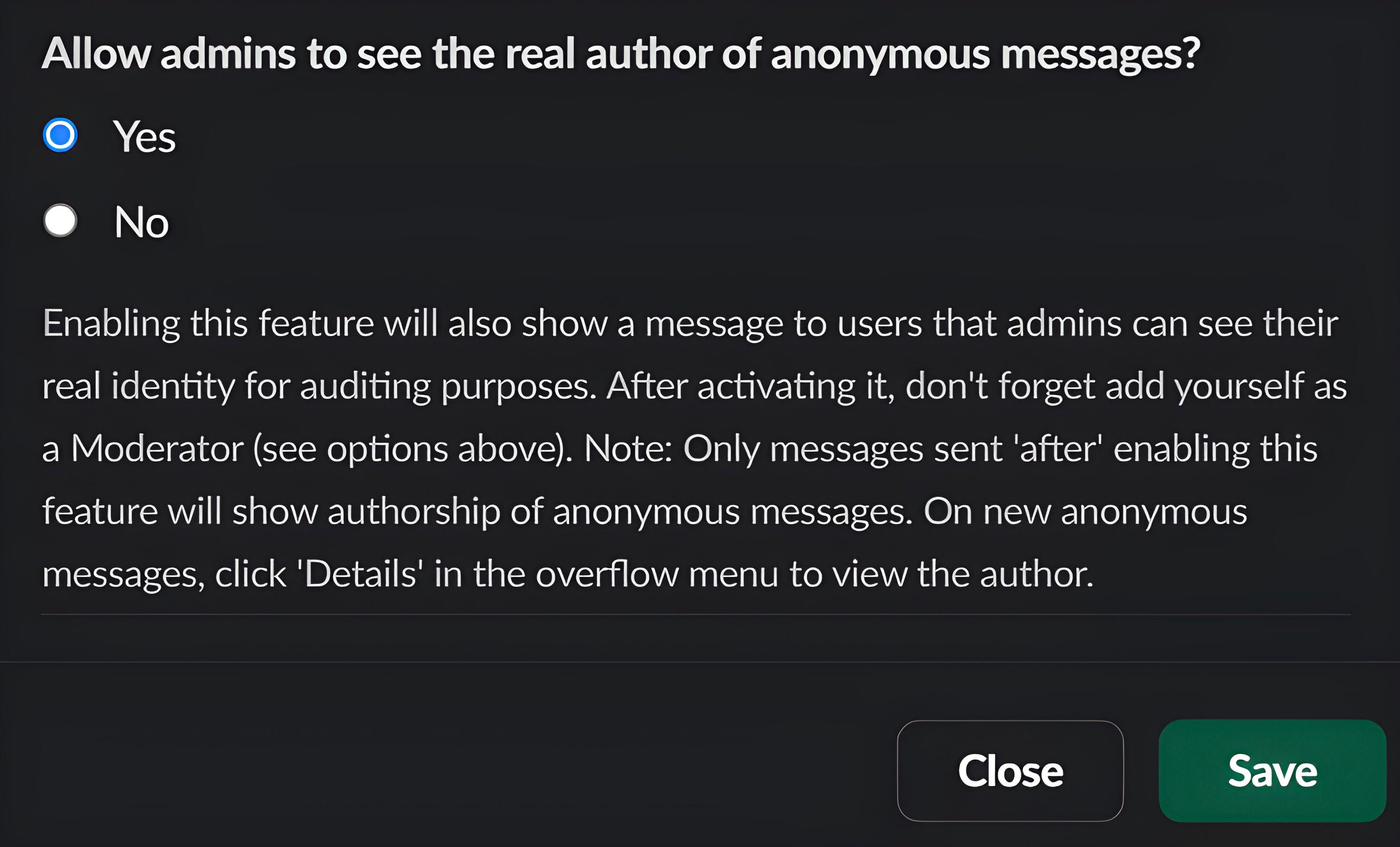
Not by default. The message is posted by the Anony Botter app, so admins and members see the app, not the person. The exception is audit mode, an opt-in Enterprise setting. When it is on, senders see a notice before posting, and owners, admins and moderators can see who sent messages posted while it was on.
The full answer: is Anony Botter really anonymous?
How can admins see the real author of anonymous messages?
Only with audit mode, an Enterprise setting that is off by default. To turn it on, open the app's Home tab and choose Configure on the Audit mode card. Owners, admins and moderators can then open a message's menu and choose Details to see the author. It works only for messages sent while it was on, and stops working if it's turned off or the workspace leaves Enterprise.
Will I know if audit mode is turned on?
Yes. While audit mode is on, the anonymous message window shows a privacy notice saying that workspace admins can see who sends anonymous messages. You see it before you post, so you can decide whether to send.
Can audit mode reveal messages sent before it was turned on?
No. Each message is marked at the moment it is sent. Only messages sent while audit mode is on can be revealed. Turning it on later does not expose earlier messages, and messages sent while it was off stay anonymous even if it is switched back on.
Do Slack exports or DMs reveal who sent an anonymous message?
The channel post belongs to the Anony Botter app, so a Slack export shows the app as the sender. But Anony Botter sometimes DMs the author, for example reply notifications on Plus or AI review prompts on Enterprise. Those DMs sit in the author's own Slack messages, so on plans where owners can export DMs, an approved export could include them.
Polls and replies
How do I create an anonymous poll in Slack?
Open Slack's shortcuts menu in the message box, search for Anony Botter and choose "Poll Anonymously". You can also use the Create Anonymous Poll button on the app's Home tab. Enter a question and between 2 and 5 options, then pick a channel. Free workspaces can post 1 anonymous poll per day; Plus and Enterprise are unlimited.
More on anonymous polls for Slack and the polling guide.
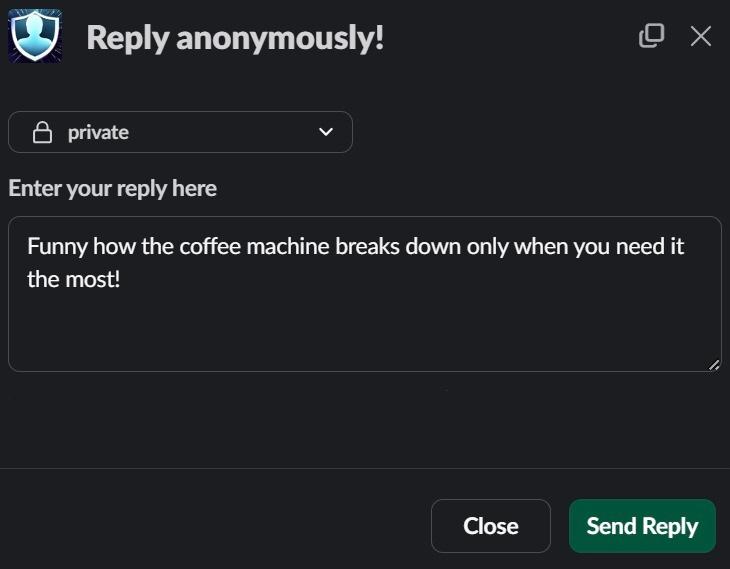
What are thread pseudonyms?
On Plus and Enterprise, each anonymous participant in a thread gets a consistent pseudonym, and the person who started the thread is marked with an Original Poster badge. Readers can follow who is answering whom without anyone's name being shown.
See thread pseudonyms.
Moderation and admin controls
How does community flagging work?
Members vote on each anonymous message, and the community can hide it. Every anonymous message has thumbs-up and thumbs-down buttons. Once a message has at least 5 votes and 51% or more are thumbs-down, it is hidden automatically. If most people approve, it stays visible. Community flagging is included on every plan, including Free.

How do I get alerts when a message is flagged?
On Plus and Enterprise. Create a private channel and invite the app with /invite @Anony Botter. Then open Anony Botter's Home tab, choose Configure on the Flagged alerts card and select that channel. An alert is posted there whenever someone reports an anonymous message.
Can admins or moderators hide a message immediately?
Yes. Workspace owners and admins can flag an anonymous message as inappropriate from its menu, which hides it right away. On Enterprise you can also add any number of moderators with the same ability, using the Moderators card on the app's Home tab.
How do I require approval before anonymous messages are posted?
On Enterprise, create a private channel and invite Anony Botter, then choose Configure on the Admin approval card on the Home tab and select that channel. Each anonymous message waits there until a moderator approves it. Approved messages are posted. Declined ones are not posted, and the author isn't told. Approving doesn't reveal who wrote it.
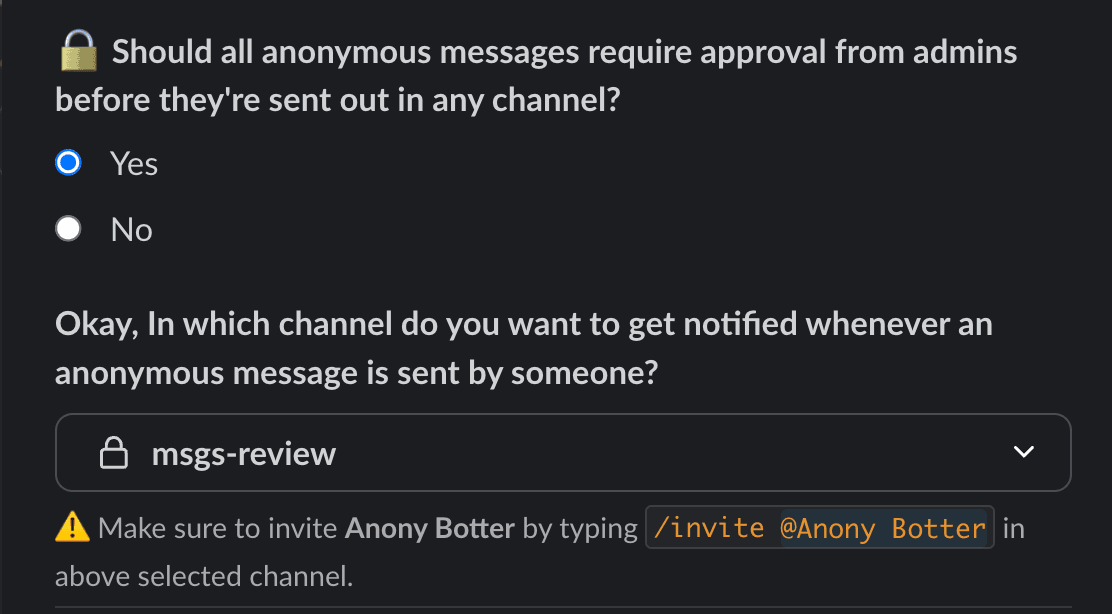
Can I limit which channels allow anonymous messages?
Yes, on Enterprise. Choose Configure on the Channel restrictions card on the app's Home tab, then pick the channels where anonymous posts are allowed. People can then only send anonymous messages to those channels.
Can I turn off anonymous thread replies?
Yes, on every plan. On the app's Home tab, open General rules and turn on "Disable anonymous replies". People can still reply in threads, but only under their own names. This keeps feedback as separate posts instead of long anonymous threads.
What do the AI moderation features do?
Plus includes an AI toxicity scan: when an admin turns it on, messages that read as harassment, hate or threats are flagged for admins with the reason. Enterprise adds four more AI features. Banned topics checks drafts against topics you list. Tone Coach spots a hostile tone before sending and offers a rewrite. Auto-translate converts messages to the workspace language. AI Mod Summary adds a short summary and suggested action to approval cards. Enterprise can also route polls through an approval queue. AI checks may DM the author about their draft.
Overview in the admin guide to anonymous message controls.
Why wasn't my anonymous message posted?
The most common reasons: the same message was sent in the last 5 minutes; it contains @here or @channel and your workspace blocks them; the channel isn't on your workspace's allowed list; it's waiting for moderator approval or was declined; or the free daily limit was reached. For a private channel, the app must be invited first with /invite @Anony Botter.
@here, @channel and thread broadcasts
Can I block @here and @channel in anonymous messages?
Yes, on every plan. On the app's Home tab, open General rules and turn on "Block @here and @channel". It is off by default. Once it's on, an anonymous message that contains @here or @channel is rejected before it posts, and mentions of individual people still work. It doesn't affect regular Slack messages; Slack's own admin settings control those.
How to restrict @here and @channel across Slack: full guide.
Can I stop anonymous replies from being sent to the channel?
Yes, on every plan. On the app's Home tab, open General rules and turn on "Hide 'Also send to channel'". It is off by default. Once it's on, anonymous thread replies can't be broadcast back to the main channel. It applies to replies made through Anony Botter only, not to regular Slack replies.
What Slack itself allows for thread broadcasts: full guide.
Plans and billing
How much does Anony Botter cost?
Anony Botter is free to start. Free includes 20 anonymous messages, then 3 per day, plus 1 anonymous poll per day. Plus is $8 per month, or $7.20 per month billed annually, and adds unlimited messages and polls and an AI toxicity scan. Enterprise is $29.99 per month, or $26.92 per month billed annually, and adds approval, audit mode and AI policy tools. Prices are per workspace, not per user.
Full comparison on the pricing page.
What happens when the free message limit is reached?
Anonymous posts stop until the next day, which starts at midnight UTC. A Free workspace gets 20 anonymous posts to start, then 3 per day, and messages, thread replies and polls all count. The sender sees a notice, and the person who installed the app and the workspace owners get a DM about the limit that doesn't say who tried to post.
How do I change my subscription plan?
Open Anony Botter's Home tab in Slack and click the plan button, which reads Upgrade on Free and Manage on paid plans. You'll see your current plan and the others. Click Choose next to the plan you want to go to a secure checkout. Only workspace admins or the person who subscribed can change the plan.
Step-by-step with screenshots: how to change your plan.
Didn't find the answer?
Install the free plan and try it in a test channel, or send us a question.