
Use case
Slack Suggestion Box: An Anonymous Template You Can Copy
Updated November 20, 2026
Short answer
To run an anonymous suggestion box in Slack, create a channel like #triage-suggestions, install Anony Botter, and have people post with /anony. Each suggestion shows as posted by the app, not the person. A named owner reviews weekly and replies in the thread. Free allows 20 posts to start, then 3 per day per workspace.
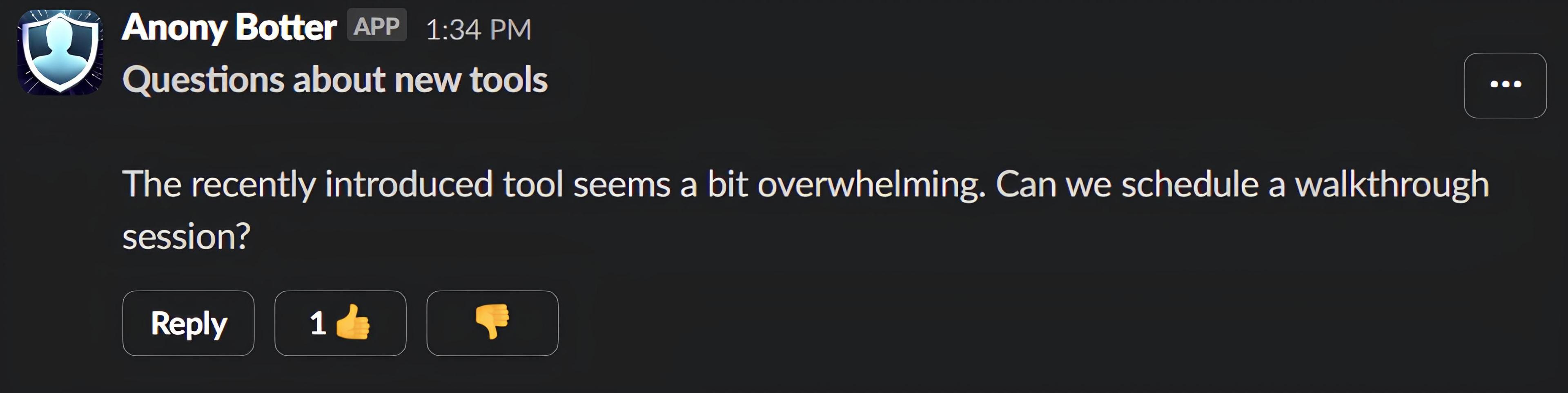
A suggestion box works when people trust it and can see that something happens. This page covers both. You get a copy-and-paste template for the channel, its rules and its follow-up posts, then the setup steps for running it with Anony Botter. The templates that rank for this search cover the intake form. None of the ones we checked include a review routine, and that routine decides whether people keep posting.
Collecting feedback more broadly, with surveys, manager feedback or retros? Start at the anonymous feedback in Slack hub. For questions at all-hands meetings, see anonymous questions in Slack.
What's in the Slack suggestion box template?
The template has seven parts: a channel name, a channel description, a rules canvas, a review cadence with response-time targets, a monthly "You said, we did" update, a plan for posts that belong somewhere else, and three numbers to check each quarter. Copy each block, fill in the brackets and you're ready to set it up.
Channel name
Slack's channel-naming guide (checked November 2026) recommends six prefixes: help-, team-, proj-, announce-, triage- and event-. Names can use lowercase letters, numbers, hyphens and underscores, up to 80 characters (Slack API docs, 2026). Pick the option that matches the box's scope:
| Channel name | Use it for |
|---|---|
#triage-suggestions | A workspace-wide box where one owner sorts incoming ideas |
#team-design-suggestions | One team's box, owned by that team's lead |
#proj-office-move-suggestions | A short-lived box for one project, archived when it ends |
#event-offsite-suggestions | Ideas before an event, plus a retro afterwards |
#announce-you-said-we-did | Optional read-only channel for the monthly update, if you don't want it in the box itself |
Channel description
The same naming guide suggests adding a topic and a description to every channel. Keep it short and put the promise up front: who reads the suggestions, and how fast they reply.
Anonymous suggestion box. Post with /anony (it shows as Anony Botter, not you). [Owner name] reviews every [Friday] and replies in the thread within [5 working days]. Not for HR or conduct issues: see the canvas tab.
Rules canvas
The rules canvas answers the questions people won't ask out loud. Who reads this? Can they tell it was me? What happens to my idea? Paste this into a canvas tab in the channel (setup steps below) and replace the brackets.
How this suggestion box works

Owner: [Name, role]    Backup: [Name, role]
We review new suggestions every [Friday] and reply in each thread within [5 working days].

How to post
- Type /anony in any channel, choose #[channel-name], write your suggestion and send.
- It appears as posted by the Anony Botter app, not by you.
- To add to an idea, click Reply on the post to reply anonymously, or reply as yourself.
- Support an idea with 👍. Use 👎 only for posts that break these rules: enough 👎 votes hide a post automatically. Disagree in the thread instead.

What makes a useful suggestion
- One idea per post.
- Say what isn't working today and what you'd change.
- Processes, tools, meetings, the office, perks and policies are all welcome.
- Write about the issue, not your own situation, if you want to stay hard to identify.

Not for this channel
- Complaints about a named person, harassment, discrimination, safety or legal concerns.
  Take these to [HR contact] or [#reporting-channel], where they can be handled confidentially.
- Urgent IT or facilities problems: use [#help-it].
- Posts that name or identify a coworker will be hidden.

What happens next
The owner replies in the thread with one of these:
✅ Doing it: who owns it and a rough date
🔍 Looking into it: what we need to find out, and when we'll update
❌ Not now: the reason
↪️ Passed on: who it went to
On the first [Monday] of each month we post "You said, we did" with the results.

Privacy
Posts show as Anony Botter in Slack.
Admin author visibility (Enterprise audit mode) is [off] in our workspace. If it's ever turned on, you'll see a privacy notice before you send.
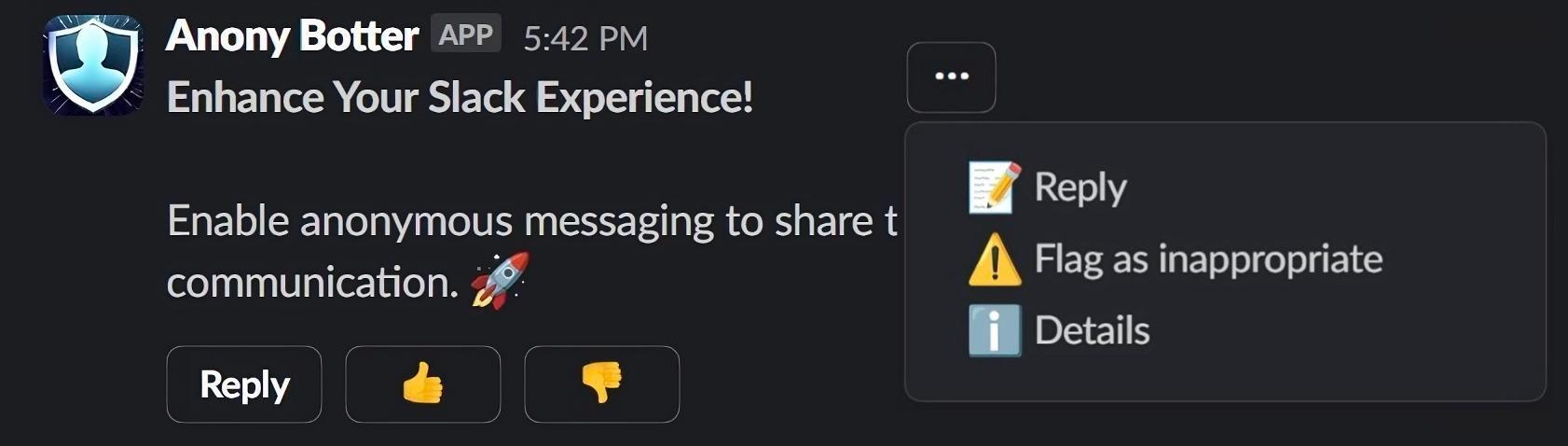
That line about 👎 matters more than it looks. On an anonymous post, 👎 isn't a "disagree" button. It's the community flag, and a post with at least 5 votes and 51% or more disapproval is hidden automatically. A popular but divisive suggestion can disappear if people use 👎 to disagree, so ask them to argue in the thread.
Review cadence and response times
A weekly review is the smallest routine that still feels responsive. These targets are a starting point. Change the numbers, but publish whatever you pick in the description and the canvas, so people know what to expect.
| When | What the owner does | Target |
|---|---|---|
| Within 2 working days of a post | Adds an 👀 reaction so people can see it's been read | Every post acknowledged |
| Every [Friday], about 30 minutes | Replies in each new thread, under their own name, with a status: doing it, looking into it, not now, or passed on | Every suggestion answered within 5 working days |
| First [Monday] of each month | Posts "You said, we did" | Covers every suggestion from the past month |
| Every quarter | Checks the three numbers below and adjusts the rules | Answer rate stays at 100% |
The owner's replies under their own name don't use any of the Free plan's allowance. Only anonymous posts count.
"You said, we did" monthly update
Thread replies alone aren't enough. The app posts each suggestion, so the person who wrote it isn't following the thread, so they may never see your reply when you reply. On Plus, Anony Botter DMs the original poster when someone replies anonymously through the app, but a reply under your own name doesn't trigger that DM. A monthly post in the channel reaches the people who never reopen old threads.
📬 You said, we did: [Month Year]

[12] suggestions this month · [4] doing · [3] looking into it · [3] not now · [2] passed on

✅ You said: "[Short summary of the suggestion]"
   We did: [What changed], starting [date]. Owner: [name]

🔍 You said: "[Short summary]"
   We're: [What's happening]. Next update: [date]

❌ You said: "[Short summary]"
   Not now, because: [Honest reason]

↪️ You said: "[Short summary]"
   Passed to: [Team or person], who will reply in the thread by [date]

Links to every thread are in the replies below.
Got another idea? Type /anony and choose #[channel-name].
When two or three suggestions compete for the same budget, let the channel pick. The "Poll Anonymously" shortcut creates a poll with 2 to 5 options and live totals. Free workspaces get 1 poll per day.
What to do with abuse or HR complaints
A suggestion box isn't a reporting line. Posts about harassment, discrimination, safety or a named manager need a process that can investigate, protect people and keep records. A public channel can't do any of that, and an anonymous accusation in a public thread can hurt the person named. When one turns up:
- Don't debate it in the thread, and don't try to work out who wrote it.
- Post a short message in the channel that points to the right route without repeating the details (template below).
- Hide the original if it names or identifies someone. Workspace owners and admins can do this on any plan from the post's ⋯ menu, with Flag as inappropriate.
- Pass the substance to HR yourself if your policy requires it.
A recent post raised a concern that needs a confidential process, so we've taken it out of this channel. If that was you, please take it to [HR contact] or [#reporting-channel]. [You can report anonymously there too.] Thank you for speaking up.
If people need an anonymous route for these reports, set up a separate anonymous whistleblower hotline in Slack with its own owners. Keep it apart from the suggestion box, so the box can stay light and public.
How do you know the box is working?
Anony Botter has no analytics or export, so tally these by hand from the channel once a quarter:
- Suggestions per month. A steady trickle is healthy. A drop after a few months usually means people stopped believing anything happens.
- Answer rate. The share of suggestions with an owner reply inside your target. Aim for all of them.
- Decision rate. The share that reached Doing it, Not now or Passed on within 30 days, instead of sitting at Looking into it.
How do you set up a suggestion box in Slack?
Setup takes eight steps, and only one of them needs Anony Botter. You create the channel in Slack, which every Slack plan allows (Slack Help, checked November 2026). Then you install the app, add the rules and announce it. Public channels work as soon as the app is installed.
- Create the channel. Click + in the sidebar and choose Channel. On paid plans, pick Blank channel. Enter a name from the table above, choose public or private, and click Create. Members can find and join public channels, while private channels need someone to add you (Slack Help). Public suits a workspace-wide box, and private suits a team or leadership box.
- Add the description. Paste the channel description from the template.
- Install Anony Botter. Use Add to Slack. It can post to public channels straight away.
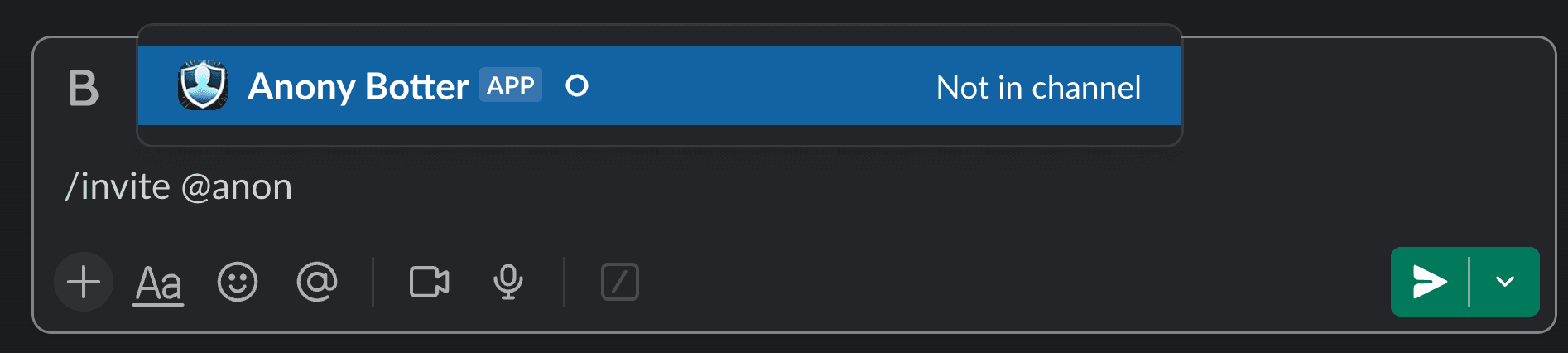
- Invite the app to a private channel. Type
/invite @Anony Botterin the channel first. - Check posting permissions. Slack lets you limit who can post and reply in a channel: click the channel name, open the Settings tab and click Edit next to Posting permissions (Slack Help). Keep the suggestion channel open so people can reply as themselves. Restricting posts makes more sense in a separate
#announce-channel for the monthly update. If you do restrict the box itself, send one test/anonypost afterwards to confirm the app can still post. - Add the rules canvas. Use Add canvas tab in the channel header, paste the rules and set that canvas to open by default. Channel managers can choose which canvas opens first (Slack Help).
- Turn on the guardrails you want. In Anony Botter's App Home, open General rules. There you can block @here and @channel in anonymous posts and hide "Also send to channel" on anonymous replies. Both are free, both start off, and neither changes normal Slack messages.
- Announce it. Post the announcement below in a channel everyone reads, then pin it in the box.
Announcement message template
📮 New: an anonymous suggestion box in #[channel-name]

Got an idea to improve how we work? Here's how it works:
• Type /anony anywhere, choose #[channel-name], write your idea and send. It posts as Anony Botter, not as you.
• [Owner name] reads every suggestion and replies in the thread within [5 working days].
• On the first [Monday] of each month we'll post "You said, we did" with what changed.

Not for HR, conduct or safety issues: those go to [HR contact or #reporting-channel].
The full rules are in the channel's canvas tab.
[Free plan only: if you see a daily-limit notice, try again tomorrow.]
Why not use Slack's built-in Feedback template?
Slack's Feedback template (checked November 2026) is a good tracker for named feedback, but it isn't anonymous. Its form workflow posts a message that mentions the person who filled it out (Slack Help, 2026). The workflow activity log also lets workflow managers filter runs by person (Slack Help, 2026).
To be fair, the template does things Anony Botter doesn't. It sets up an instructions canvas, a feedback tracker list, a form featured in the channel and a workflow that posts when an item's status changes. If people are happy to put their names on feedback, such as tool requests or bug reports, use it. Slack's article doesn't mention anonymity or name a required plan.
| Feature | Slack Feedback template | Anony Botter channel |
|---|---|---|
| Shown as the author | The form message mentions the submitter | The Anony Botter app |
| Who else can see the submitter | Channel members, through the mention. Workflow managers can filter the activity log by person (paid plans, last 90 days) | Nobody in Slack. Anony Botter's database records the sender, and Enterprise audit mode shows admins senders only while it's on |
| Status tracking | Built-in tracker list and status notifications | None built in: status lives in your thread replies |
| Following up with the submitter | You know who it is, so you can DM them | Thread replies, which they can answer anonymously |
| Others weighing in | Depends on how you share the list | 👍 and anonymous or named replies in each thread |
You can combine them. Run the anonymous box with Anony Botter, and have the owner copy each suggestion and its status into whatever tracker you already use.
What about Polly's suggestion box template?
Polly's suggestion box template is a monthly box whose only content is an instruction to leave anonymous feedback. According to Polly's help center (both checked November 2026), anonymity and moderation are on by default. Submissions can post to a channel, collect in one thread or stay web-only, and replies can be public, by DM or anonymous. Some options need a paid plan. If you want a web-only inbox that nobody else sees, Polly does that and Anony Botter doesn't. Neither template gives you the routine, though: the names, rules, cadence and monthly update above.
How do you moderate an anonymous suggestion box?
Every plan includes basic moderation. On Free, a post is hidden automatically once it has at least 5 👎 votes and 51% or more disapproval, and workspace owners and admins can flag or hide any post. Plus sends flagged posts to a private alert channel. Enterprise adds an approval queue, so nothing appears until a moderator approves it.
| Plan | What it adds for a suggestion box |
|---|---|
| Free | Community 👎 auto-hide. Owners and admins can flag or hide. Block @here and @channel in anonymous posts. Hide "Also send to channel" on anonymous replies. Choose whether anonymous thread replies are allowed. |
| Plus | Flagged-message alerts to a private channel. Thread pseudonyms with an Original Poster badge, so you can tell when the person who made the suggestion replies. Reply-notification DMs for anonymous replies. Per-user thread mute. An AI toxicity scan that flags harassment, hate and threats for admins. |
| Enterprise | Approval queue (approving doesn't reveal the author). Unlimited moderators. Channel whitelist, so anonymous posts only go to the channels you choose. AI banned topics, AI tone coach, AI moderator summary and a poll approval queue. Audit mode, which is off by default. |
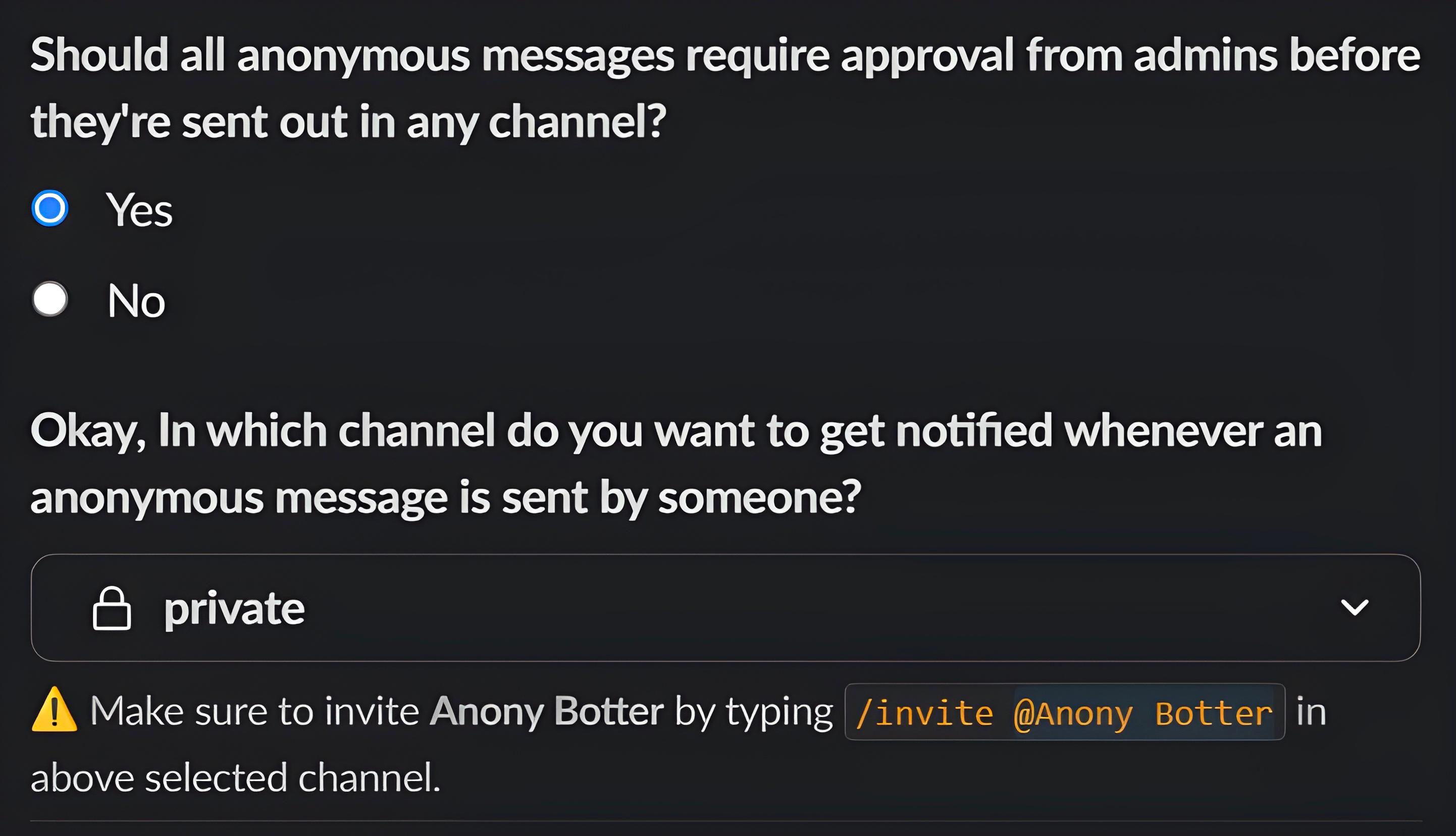
With the approval queue on, each suggestion goes to a private approval channel first, and a moderator approves or declines it. A declined suggestion isn't posted, and the author isn't told. So the rules canvas has to say up front what gets declined and where HR issues go instead. Otherwise someone with a real complaint just hears nothing back.
Which plan do you need for a Slack suggestion box?
Most teams can start on Free: 20 anonymous posts, then 3 per day for the whole workspace, resetting at midnight UTC. Suggestions, anonymous replies and polls all count. A busy box or lively anonymous threads will hit that limit, and that's when Plus ($8/month, or $7.20/month billed annually) makes sense. All prices are per workspace.
| Plan | Price | For a suggestion box | Good fit |
|---|---|---|---|
| Free | $0 | 20 anonymous posts to start, then 3 per day across the workspace (polls capped at 1 per day). Flagging with auto-hide, @here blocking. | A pilot or a quiet team box |
| Plus | $8/month, or $7.20/month billed annually ($86.40/year) | Unlimited anonymous posts and polls, flagged-message alerts, reply-notification DMs, thread pseudonyms, per-user thread mute | A workspace-wide box with active anonymous discussion |
| Enterprise | $29.99/month, or $26.92/month billed annually ($323/year) | Approval queue, unlimited moderators, channel whitelist, AI moderation tools, audit mode | A box run by HR or leadership where every post is reviewed |
When the Free limit is reached, the sender sees a notice, and the person who installed the app and the workspace owners get a DM that doesn't say who tried. Compare every feature on the pricing page, or start on Plus if you expect more than a few posts a day.
Who can see who suggested it?
In Slack, nobody can see who posted a suggestion: members, managers and workspace admins all see the Anony Botter app as the author. Enterprise audit mode can show senders to admins, but only for messages sent while it's switched on.
- Audit mode. It's Enterprise only and off by default. While it's on, people see a privacy notice in the compose window before they send. Owners, admins and moderators can then see the author of those messages only.
- The approval queue. Approving or declining a suggestion doesn't reveal who wrote it.
- DMs from the app. Reply notifications sit in the author's own Slack DMs, so your company's Slack retention and export rules apply to them.
- What you write. No app can hide your writing. In a team of six, a suggestion about a process only you run points to you.
For the full chain, including what Slack exports contain, read is Anony Botter really anonymous?
Why does closing the loop matter so much?
Closing the loop matters because most employees doubt their input changes anything. Only 1 in 4 employees globally strongly agree their opinions count at work (Gallup, 2023). Only 8% strongly agree their organization acts on surveys (Gallup, 2024). A box that collects ideas and never answers proves them right.
The same 2023 Gallup article describes a client that collected over 9,000 idea submissions and did nothing with them. In the 2024 data, 38% didn't know whether their organization acted on surveys at all. That's a visibility problem as much as an action problem, and the monthly update fixes it even in slow months.
The U.S. picture hasn't moved much. As of August 2026, 26% of U.S. employees feel their opinions count at work (Gallup indicator, 2026). Gallup's Q12 summary (undated, checked November 2026) links doubling the share who feel their opinions count to 22% lower turnover, 33% fewer safety incidents and 10% higher productivity.
Frontline staff aren't the only ones who feel ignored. In a SafetyCulture survey of 3,028 frontline middle managers, 42% said senior leaders didn't treat their ideas as a priority (HR Dive, 2026). That's a vendor survey reported by trade press, but it matches the Gallup pattern. For more ways to collect input and act on it, see how to collect anonymous feedback in Slack.
Frequently asked questions
Does Slack have a suggestion box template?
Slack has a Feedback template rather than a suggestion box template. It sets up an instructions canvas, a feedback tracker list, a feedback form workflow and a workflow that posts status updates. It's good for tracking named feedback, but Slack's form message mentions the person who filled it out, so it isn't anonymous. For an anonymous box, use an app like Anony Botter with the channel template on this page.
Can Slack Workflow Builder forms be anonymous?
Not with Slack's own form template. Slack's help center says the message the form posts mentions the person who filled it out and includes their response. On paid plans, workflow managers can also filter the workflow activity log by person for the last 90 days. If people need to stay anonymous inside Slack, you need a third-party app.
How is a Slack suggestion box different from a Google Form?
A form lives outside Slack, so people have to remember the link, and only whoever owns the responses sees the ideas. A Slack channel keeps suggestions where people already work, lets others back an idea with 👍 or add to it in the thread, and puts the owner's reply where everyone can read it. A form is the better choice if only reviewers should see suggestions.
Do we need a paid plan to run a suggestion box?
No. The Free plan gives the workspace 20 anonymous posts to start, then 3 per day, and suggestions, anonymous replies and polls all count. That suits a pilot or a quiet box. Plus ($8/month, or $7.20/month billed annually) removes the limit and adds flagged-message alerts and reply-notification DMs. Enterprise adds the approval queue. Pricing is per workspace, not per user.
How do we stop trolls or off-topic posts?
Start with clear rules in the channel's canvas. On every plan, a post with at least 5 👎 votes and 51% or more disapproval is hidden automatically, and workspace owners and admins can flag or hide posts. Plus sends flagged posts to a private alert channel. On Enterprise you can turn on an approval queue, so a moderator reviews each suggestion before it appears.
Who should own the suggestion box?
Pick one named owner and a backup who can make decisions or route them, such as an operations lead or chief of staff. Put both names in the channel description and the rules canvas. The owner reviews weekly, replies under their own name and writes the monthly update. A box owned by a whole leadership team in general is easy for everyone to leave unanswered.
Can we run more than one suggestion box?
Yes. Anony Botter works in any public channel and in private channels it has been invited to, so you can run a workspace-wide box, a team box and a short project box at the same time. Give each one its own owner and rules. On Free they all share one daily allowance. Enterprise's channel whitelist limits anonymous posting to the channels you choose.
What should we do with complaints about a manager?
Don't handle them in the suggestion box. A public channel can't investigate or protect the people involved. Post a short message pointing to HR or a confidential reporting route, hide the original if it names someone, and pass the substance on if your policy requires it. If people need an anonymous route for these reports, set up a separate reporting channel with its own owners.